
As a homeowner in New Port Richey for the past 18 years, I use the Pasco County Property Appraiser’s interactive map almost every time I need to visualize a property, check flood zones, or explore neighborhood details before making decisions.
Whether you’re evaluating a home you want to buy in Holiday, checking boundaries for a fence project in Trinity, or simply understanding flood risk in your own backyard in Hudson, this map is one of the most powerful free tools available.
This guide walks you through exactly how to use the official Pasco County Property Appraiser map in 2026 — with clear, numbered steps, what each feature shows, and practical tips I’ve learned from real-world use.
All information is current as of February 22, 2026, directly from pascopa.com and the mapping system.
Official Pasco County Property Appraiser Interactive Map
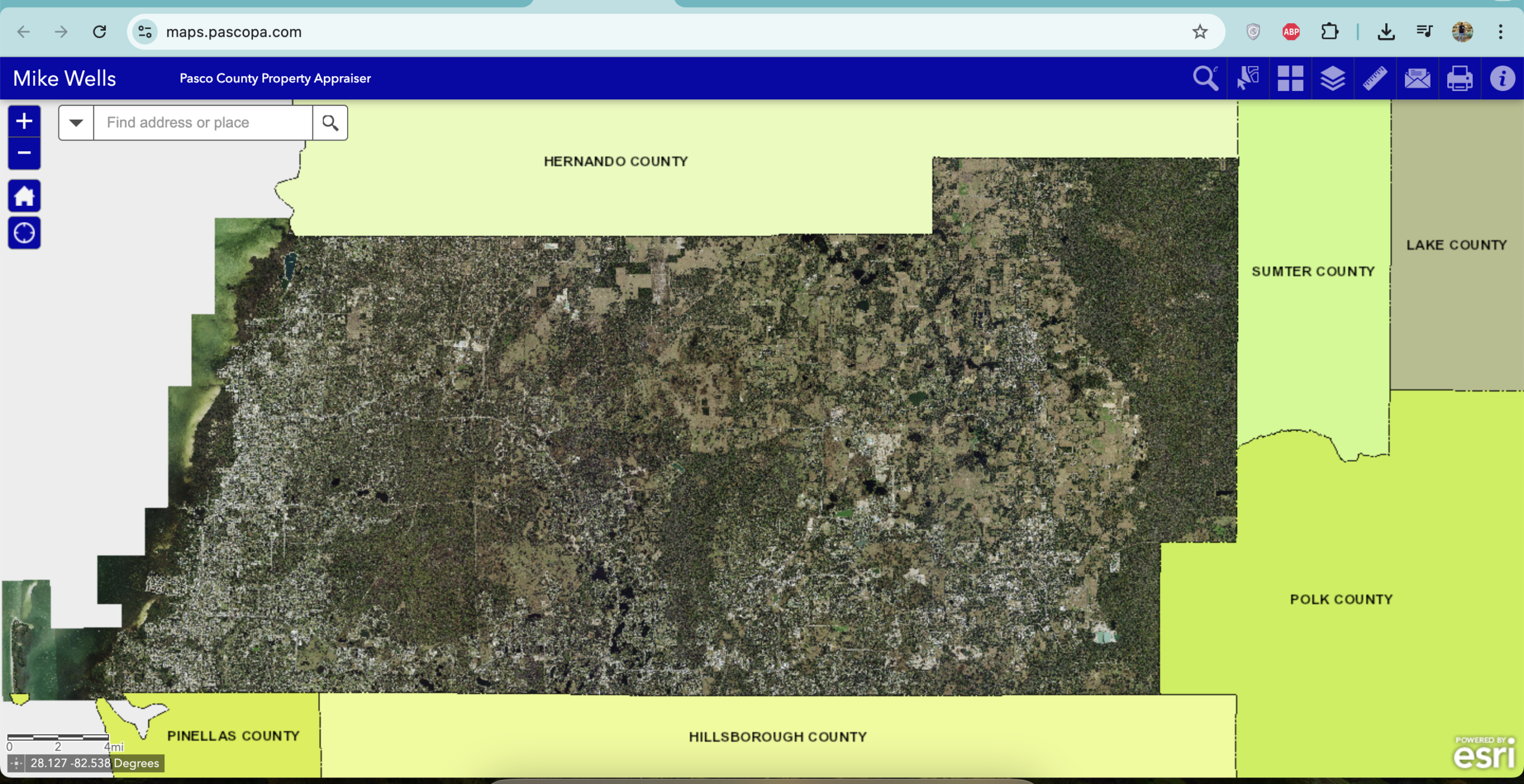
Direct link: https://maps.pascopa.com
This is the dedicated GIS mapping site maintained by Mike Wells’ office. It works on computers, tablets, and phones, requires no login, and updates regularly with the latest parcel data.
Step-by-Step: How to Use the Pasco County Property Appraiser Map
- Open the Map Go to https://maps.pascopa.com The map loads centered on Pasco County with basic street view and parcel outlines.
- Navigate to Your Area
- Type an address or street name in the search bar at the top.
- Or use your mouse scroll wheel / pinch-to-zoom on mobile to move around.
- Zoom in until parcel boundary lines appear (usually visible once you’re close to street level).
- Click on Any Parcel Click any outlined property. A pop-up appears with:
- Quick Info (owner name, address, just value, assessed value)
- Full Info button → opens the complete property record (same as search.pascopa.com)
- Turn Layers On or Off Click the Layer List icon (stacked layers) in the upper-right toolbar. Common layers you can toggle:
- Parcels (shows all property boundaries)
- Aerial Photography (high-resolution recent images)
- Flood Zones (FEMA data)
- Sinkhole Areas
- Future Land Use
- School Districts
- Civic Associations
- And more (new layers added as needed)
- Use Measurement & Drawing Tools Toolbar on the left lets you:
- Measure distance or area
- Draw temporary lines or shapes
- Print or export the current view
- Switch to Full Property Details From the pop-up, click “Full Info” to jump straight to the detailed record page with sales history, exemptions, sketches, and tax estimates.
What the Map Shows in 2026 (Key Features)
- Parcel Boundaries – Clear outlines of every property in the county
- Aerial Photos – Recent high-quality imagery so you can see pools, roofs, additions
- Flood Zones – Critical for insurance and building permits
- Sinkhole Risk Areas – Especially useful in certain parts of Pasco
- Future Land Use & Zoning – Helps when buying or planning improvements
- School District Boundaries – Important for families
- Ownership & Value Data – Click any parcel for instant details
Practical Tips I Use Regularly
- Always zoom in until parcel lines appear — otherwise the map stays in basic street view.
- For flood risk, turn on the Flood Zones layer before buying or refinancing.
- When helping seniors or parents, I open the map on my laptop and share the screen — they love seeing their property visually.
- West-side residents (New Port Richey, Holiday, Hudson): The map loads quickly and pairs perfectly with the New Port Richey office at 8731 Citizens Drive.
- Print the map view with parcel highlighted before visiting the Property Appraiser office — staff appreciate it.
- Mobile tip: Use two fingers to rotate the map if you need a different angle.
How the Map Connects to Other Tools
- From any parcel on the map → click “Full Info” → takes you to search.pascopa.com record
- From the main search page → choose “Interactive Map” option
- GIS data downloads (for professionals or investors) → https://downloads.pascopa.com (weekly parcel shapefiles updated as recently as February 15, 2026)
Pasco County Property Appraiser Offices (If You Need Help in Person)
Office |
Address |
Phone |
Best For |
|---|---|---|---|
New Port Richey (West) |
8731 Citizens Drive, Suite 130 |
(727) 847-8151 |
West Pasco residents |
Land O’ Lakes (Central) |
4111 Land O’ Lakes Blvd, Suite 106 |
(813) 929-2780 |
Central Pasco |
Dade City (East) |
14236 6th Street, Suite 101 |
(352) 521-4433 |
East Pasco & rural areas |
Need Extra Help With the Map?
If you’re having trouble finding a property, understanding a layer, or want me to describe exactly what I see when I open a specific address on the map, email me at contact@pascocountypropertyappraiser.us.
Put “Property Appraiser Map” in the subject line and include the address or parcel ID. I’ll walk you through it step by step, just like I do for neighbors here in New Port Richey.
Bookmark These Links
- Interactive Map → https://maps.pascopa.com
- Main Records Search → https://search.pascopa.com
- Official Property Appraiser Site → https://pascopa.com
Taking a few minutes to explore the map gives you a clear visual understanding of any property in Pasco County — something that numbers on a page simply cannot replace.
Use it often and you’ll feel far more confident about your home and neighborhood decisions in 2026.
Take care of your home, Raj Patel New Port Richey Resident & Founder PascoCountyPropertyAppraiser.us